
Streaming tools / Project reference
TikCord Presence
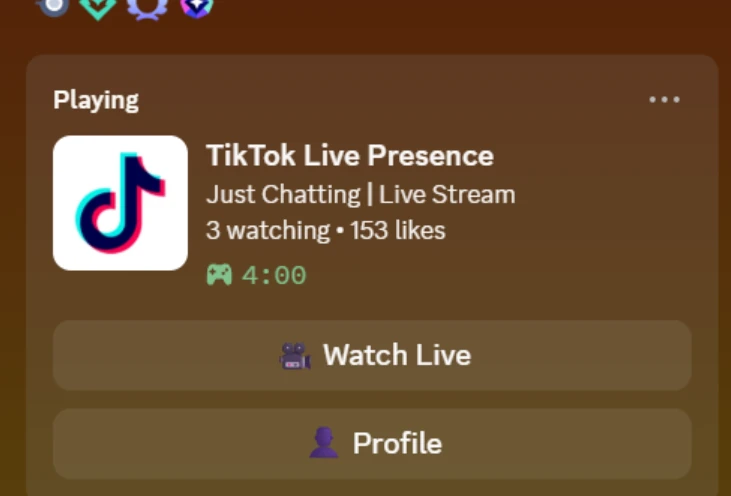
A Node.js and TypeScript bridge that mirrors TikTok LIVE status into Discord Rich Presence with stream details and watch/profile buttons.
01 / Context
What it is
A Node.js and TypeScript bridge that mirrors TikTok LIVE status into Discord Rich Presence with stream details and watch/profile buttons.
What problem it solves
TikTok LIVE activity and a Discord desktop profile are separate systems. TikCord forwards live-room state to the local Discord client so a profile can show that a stream is running and where to watch it.
Current status
The latest reviewed GitHub release is v1.0.1, published May 13, 2026. Its README documents reconnect handling and the desktop setup workflow.
02 / Visual evidence
Screenshots & integration visuals

03 / Capabilities
Features
- Detect live sessions and clear Discord activity when a stream ends or disconnects.
- Display the stream title, viewer count and like count.
- Provide Watch Live and Profile buttons on the activity card.
- Reconnect after TikTok connection drops and send rate-aware presence updates every 15 seconds.
- Configure the TikTok username, Discord application ID and artwork key in one local environment file.
Limitations to know
- The TikTok connector uses an unofficial API and may break when TikTok changes its service.
- Discord hides activity buttons on your own profile and on mobile. Verify buttons from another account viewing your desktop activity.
04 / Get started
Install instructions
Before you install
- The repository lists Node.js 18 or later. Choose a currently supported Node.js release compatible with the project rather than an end-of-life runtime.
- Run Discord desktop on the same machine and enable its activity-status display.
- Use a public TikTok account with LIVE access and your own Discord application with uploaded Rich Presence artwork.
Clone the source, install dependencies, then copy .env.example to .env. Configure the username, application ID and artwork key before starting:
git clone https://github.com/foulfoxhacks/TikCord-Presence.git
cd TikCord-Presence
npm install
# Copy .env.example to .env and edit it before continuing.
npm run dev
# For a compiled build instead:
# npm run build
# npm start
A Discord application ID is not a bot token. The setup guide explains artwork keys, local IPC and Discord activity-privacy settings.
These are instructions from the reviewed source, not a claim of a fresh end-to-end installation test. Check the pinned setup guide and current repository instructions before running software.
05 / Read the source
GitHub & documentation
TikCord Presence repository contains the current source. The documentation links below pin the revision reviewed for this page.
06 / Reuse & attribution
License
MIT
The reviewed repository includes an MIT license. This bridge is not an official TikTok or Discord product.
Read the license declaration07 / Version context
Changelog & releases
v1.0.1 fixes reconnect handling after TikTok disconnects, adds package metadata and cleans up README encoding. The README also retains the v1.0.0 history.
The creator-site changelog records changes to this reference page separately from the software's own releases.
08 / A stable reference
Author & last reviewed
- Page author / project maintainer
- Sammy The Femboy Puppy · foulfoxhacks on GitHub
- Last reviewed
- against the public README, source tree and published release records.
- Reviewed revision
649571fe187d39b1fed15953a490fe49899f7365- Permanent page URL
- https://akasammythepuppy.me/projects/tikcord/
When referencing the project, link to this page for the overview or the pinned commit for implementation-specific details. A review date records the source check, not a promise that upstream dependencies or platform behavior remain unchanged.