
Editor integrations / Project reference
UnityCord Presence
Editor-only Discord Rich Presence for Unity and VRChat Creator Companion projects, with project detection and editor activity updates.
01 / Context
What it is
Editor-only Discord Rich Presence for Unity and VRChat Creator Companion projects, with project detection and editor activity updates.
What problem it solves
A generic Unity activity label does not explain which kind of VRChat project is open or what the editor is doing. UnityCord reads local editor and VCC state to build a more specific Discord presence.
Current status
The reviewed repository has a GitHub release tagged release, published May 2, 2026. It is a source integration for a Unity project, not a complete sample Unity project or a hosted service.
02 / Visual evidence
Screenshots & integration visuals
03 / Capabilities
Features
- Initialize the integration when the Unity Editor loads.
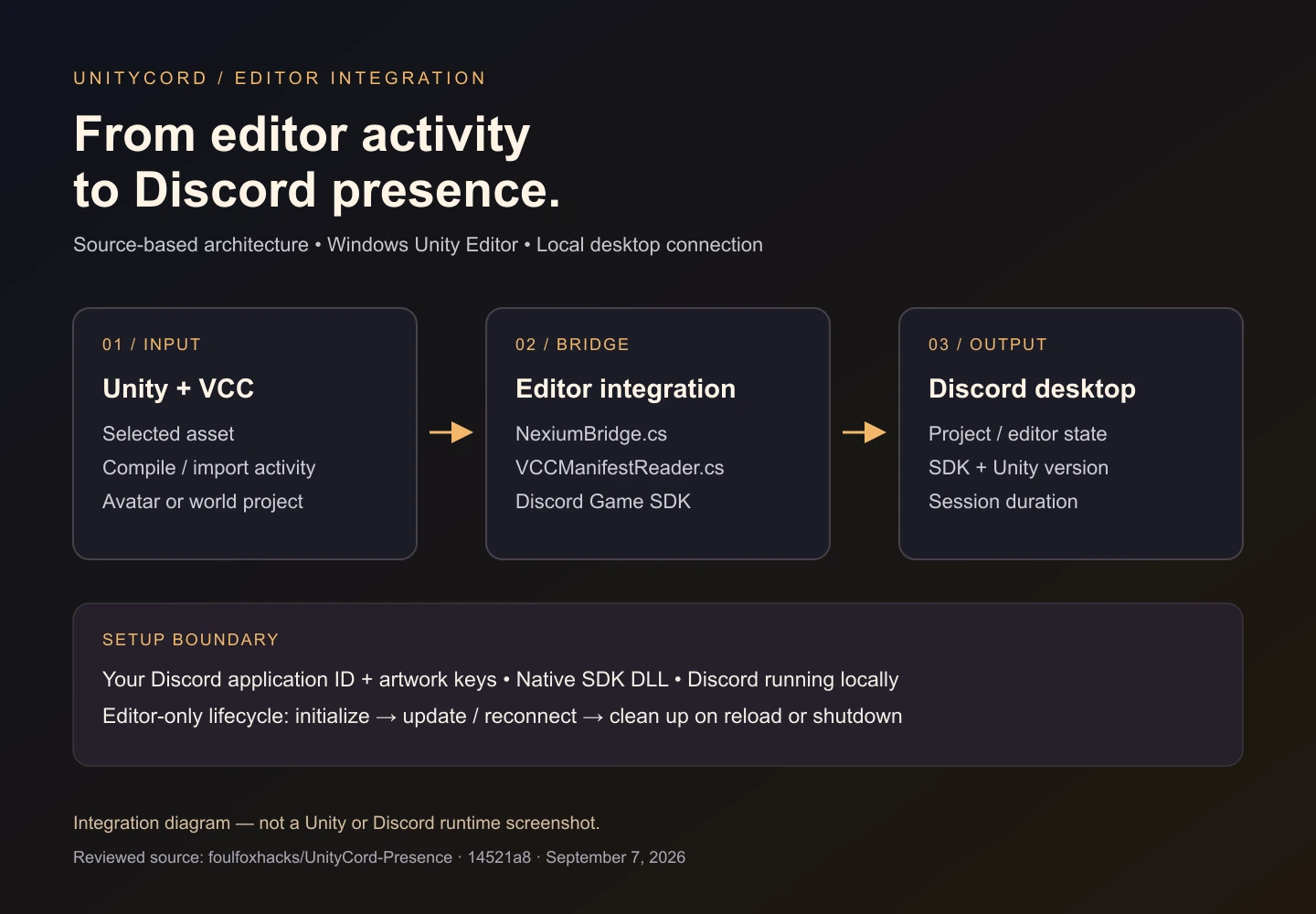
- Detect avatar and world projects through Packages/vpm-manifest.json.
- Reflect selected assets, compilation and asset import activity.
- Include VCC SDK type, package count, Unity version and session duration.
- Reconnect to Discord and clean up native SDK state during reload or shutdown.
Limitations to know
- The documented platform is a 64-bit Windows editor. Do not infer macOS, Linux or in-game runtime support from the C# source alone.
- The visual below explains the reviewed integration. A configured Unity/Discord session was not exercised for this page.
04 / Get started
Install instructions
Before you install
- Unity 2021.3 LTS or later, a 64-bit Windows Unity Editor and Discord desktop.
- Your own Discord application ID and uploaded artwork keys, plus the Discord Game SDK DLL described in the repository.
- Keep editor integration code under an Editor directory; it is not intended to run inside a published VRChat world or avatar.
Download the reviewed source or clone the repository. Follow its folder layout inside your existing Unity project's Assets directory:
git clone https://github.com/foulfoxhacks/UnityCord-Presence.git
# In your Unity project's Assets directory:
# Plugins/discord_game_sdk.dll
# Scripts/Control/Editor/NexiumBridge.cs
# Scripts/Control/Editor/VCCManifestReader.cs
# Scripts/Internal/   (repository SDK wrappers)
# Scripts/Presence/   (repository presence classes)
Use the full README file list rather than copying only the two editor scripts. Set ClientID in NexiumBridge.cs to your Discord application ID, upload the vcc_logo and unity_icon artwork keys, and reopen Unity with Discord desktop running.
These are instructions from the reviewed source, not a claim of a fresh end-to-end installation test. Check the pinned setup guide and current repository instructions before running software.
05 / Read the source
GitHub & documentation
UnityCord Presence repository contains the current source. The documentation links below pin the revision reviewed for this page.
06 / Reuse & attribution
License
MIT — declared in README
The README declares MIT, but no standalone LICENSE file was found at the reviewed revision. Check that declaration and clarify license terms with the maintainer before redistribution.
Read the license declaration07 / Version context
Changelog & releases
The repository's release page and commit history are the available change records. No separate CHANGELOG was found at this revision.
The creator-site changelog records changes to this reference page separately from the software's own releases.
08 / A stable reference
Author & last reviewed
- Page author / project maintainer
- Sammy The Femboy Puppy · foulfoxhacks on GitHub
- Last reviewed
- against the public README, source tree and published release records.
- Reviewed revision
14521a889bf55de79cbc4127f42fee689e0e7b60- Permanent page URL
- https://akasammythepuppy.me/projects/unitycord/
When referencing the project, link to this page for the overview or the pinned commit for implementation-specific details. A review date records the source check, not a promise that upstream dependencies or platform behavior remain unchanged.