
Streaming tools / Project reference
PearConnect Song Requests
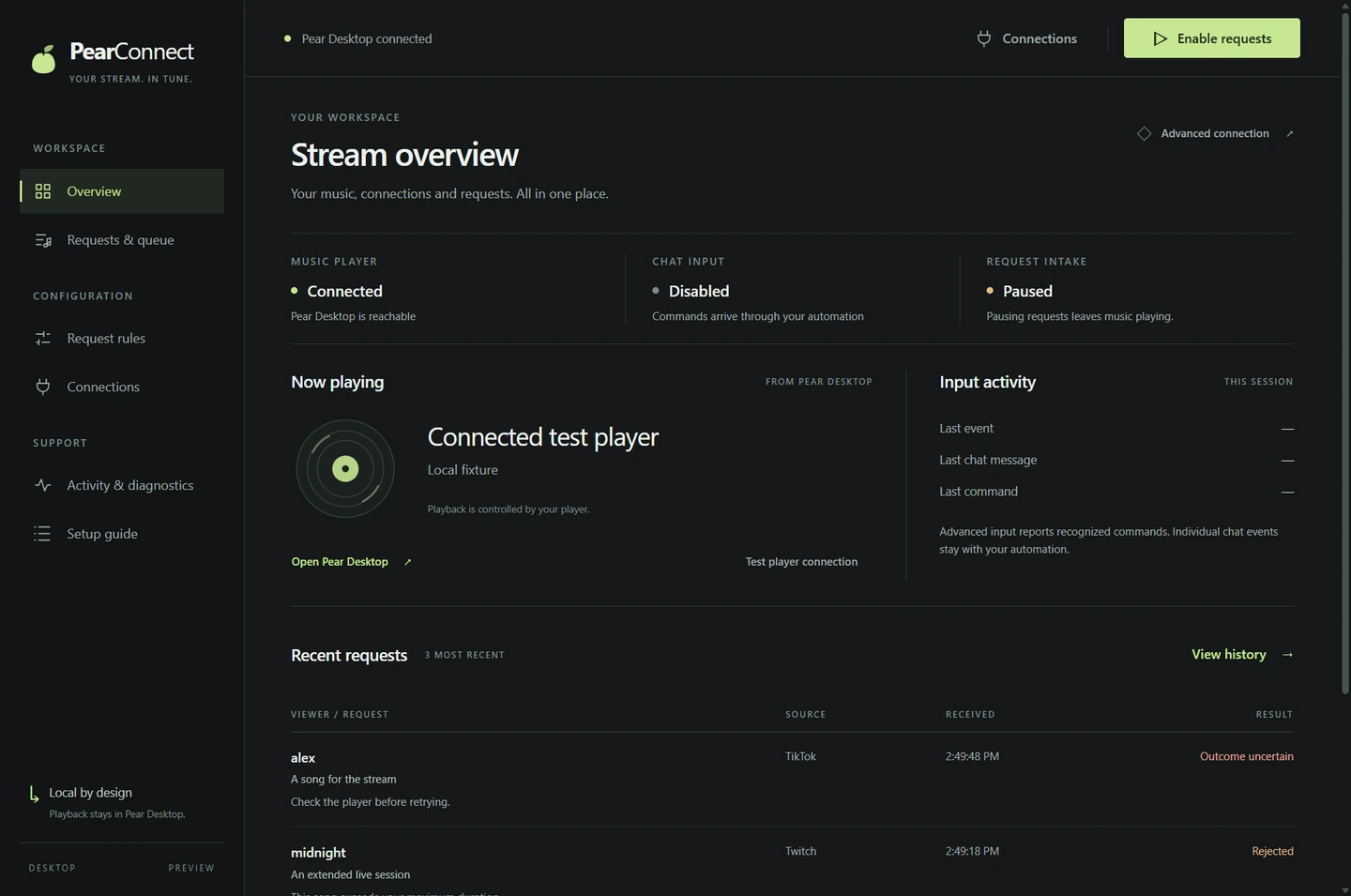
A local-first song-request bridge that connects Twitch, TikTok through TikFinity, and YouTube Live to a shared Pear Desktop queue.
01 / Context
What it is
A local-first song-request bridge that connects Twitch, TikTok through TikFinity, and YouTube Live to a shared Pear Desktop queue.
What problem it solves
Requests from several streaming platforms need one queue, consistent rules and a way for the streamer to verify the player connection. PearConnect brings the adapters, request rules and local controls together.
Current status
The latest reviewed GitHub prerelease is v0.3.0-beta.5, published September 6, 2026. Test the player connection and request flow before using it during a stream.
02 / Visual evidence
Screenshots & integration visuals

03 / Capabilities
Features
- Use the desktop console or CLI with the same local request engine.
- Combine Twitch, TikTok through TikFinity, and YouTube Live requests under shared queue rules.
- Configure cooldowns, length checks, a blocklist and allowlisted skip controls.
- Use now-playing, next-track and live-player queue overlays, including a portrait TikTok Studio layout.
- Validate configuration and rehearse requests in dry-run mode before accepting live requests.
Limitations to know
- The README records an upstream YouTube Music Desktop 3.11.0 queue compatibility issue: an enqueue acknowledgement may arrive without a new player queue entry. Verify actual playback; the bridge does not repair the player.
- The YouTube adapter is unofficial and cannot reply in chat. TikTok Simple mode also has no chat-reply path. Select one TikTok input mode to avoid duplicate requests.
04 / Get started
Install instructions
Before you install
- For a source checkout, use Node.js 22 or 24. The desktop build requires Node.js 22.12 or newer; the Windows portable bundle includes its runtime.
- Enable the Pear Desktop API plugin on localhost. TikTok Simple mode needs TikFinity on the same PC; Advanced mode uses Streamer.bot.
- Keep local environment files, player authorization tokens and platform credentials private.
The releases page provides the desktop builds. For the CLI source workflow, install dependencies and run the guided setup:
git clone https://github.com/foulfoxhacks/PearConnect-Song-Requests.git
cd PearConnect-Song-Requests
npm ci --omit=dev --ignore-scripts
npm run setup
# Rehearse without sending tracks to the player:
npm run start:dry-run -- --accept-requests
Follow the README for player authorization and platform configuration before switching from dry-run to live mode. Setup creates local configuration without overwriting an existing file.
These are instructions from the reviewed source, not a claim of a fresh end-to-end installation test. Check the pinned setup guide and current repository instructions before running software.
05 / Read the source
GitHub & documentation
PearConnect Song Requests repository contains the current source. The documentation links below pin the revision reviewed for this page.
06 / Reuse & attribution
License
MIT
The reviewed repository includes an MIT license. Platform accounts, player software and their terms remain separate requirements.
Read the license declaration07 / Version context
Changelog & releases
The reviewed beta adds live-player queue overlays, portrait layouts, separate social tickers and desktop Discord Rich Presence.
The creator-site changelog records changes to this reference page separately from the software's own releases.
08 / A stable reference
Author & last reviewed
- Page author / project maintainer
- Sammy The Femboy Puppy · foulfoxhacks on GitHub
- Last reviewed
- against the public README, source tree and published release records.
- Reviewed revision
c4495128591010fe1c9fab4ba9b2534e5f35eb0d- Permanent page URL
- https://akasammythepuppy.me/projects/pearconnect/
When referencing the project, link to this page for the overview or the pinned commit for implementation-specific details. A review date records the source check, not a promise that upstream dependencies or platform behavior remain unchanged.